The babel of AI Agents: Universal skills with skills-forge
- Fernando Souto
- Ai
- April 8, 2026
Table of Contents
Audio of the post:
The AI landscape is a fragmented map of walled gardens. You build a Custom GPT for your product team, a Gemini Gem for your researchers, and a Claude Code skill for your engineers. Each one lives in isolation — its own instructions, its own format, its own lifecycle. When the underlying expertise changes, you update three things instead of one.
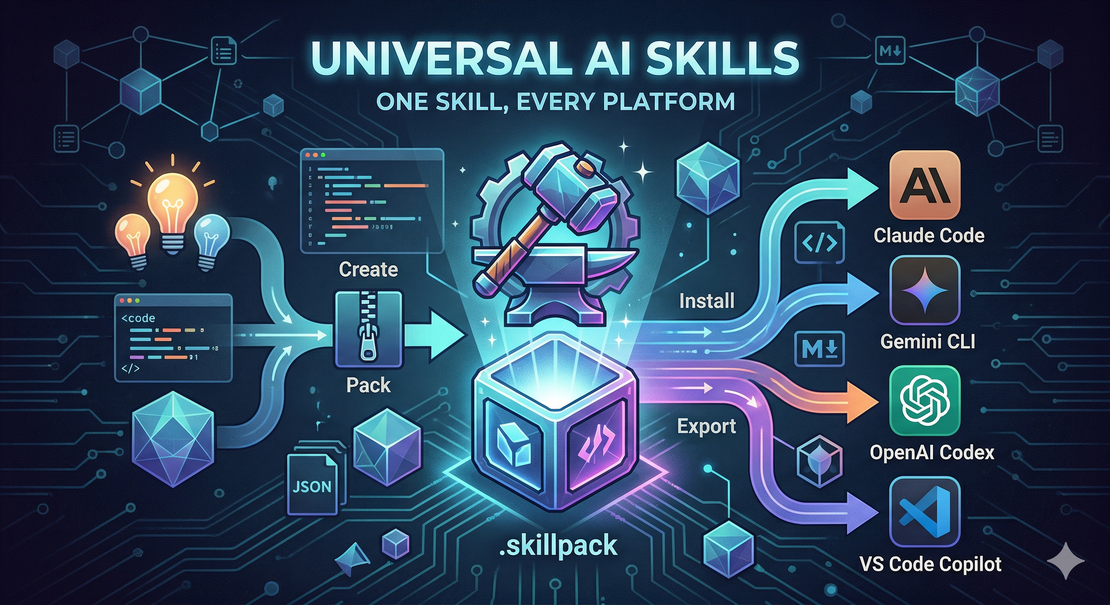
This is the instruction-manual equivalent of the Dark Ages. At skills-forge, I believe in a different future: one skill, every platform. A universal distribution and execution layer for AI competencies — engineered the same way we engineer software.
The Core Idea: Skills as Distributable Binaries
The fundamental shift skills-forge introduces is treating AI skills the way modern software treats packages. A skill is not a document you paste into a chat interface. It is a versioned, linted, distributable binary — a .skillpack — that you author once, publish to a registry, and install anywhere.
This mirrors what npm did for JavaScript or pip for Python. The difference is that the artifact carries executable AI behavior rather than code.
The format is plain Markdown (SKILL.md), following the open Agent Skills standard. Any agentic tool that speaks the standard — Claude Code, Gemini CLI, OpenAI Codex, VS Code Copilot — can consume it directly. No translation. No conversion. The same file.
Quick Start: From Zero to Installed
pip install skills-forge

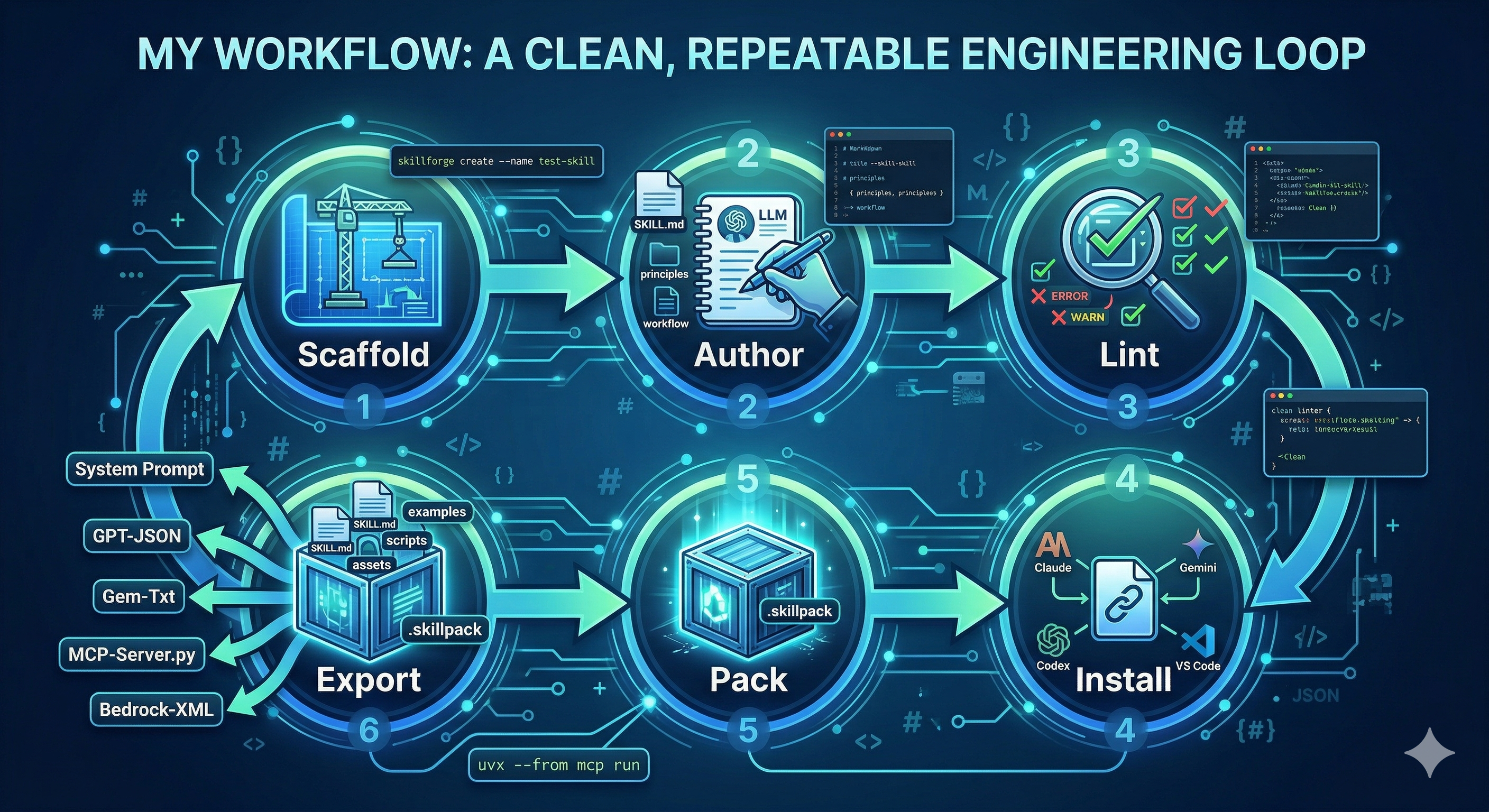
# 1. Scaffold
skills-forge create \
  --name python-tdd \
  --category development \
  --description "Use for TDD with Python. Triggers: pytest, test-first, red-green-refactor." \
  --emoji 🔴

# 2. Lint — catches vague descriptions, token budget violations, broken references
skills-forge lint output_skills/development/python-tdd

# 3. Install to every supported tool at once
skills-forge install output_skills/development/python-tdd --target all
The install writes a symlink to your source file. Edit your SKILL.md, and the change is picked up instantly by every agent tool pointing at it — no reinstall required.
Why This Changes Everything for Organizations
The real power of skills-forge is not the CLI. It is what happens when you combine it with skill registries — version-controlled repositories of .skillpack binaries your entire organization installs from.
Think of it as your company’s private npm registry, but for AI capabilities.
One Source of Truth Across Every Team
Today, your security team maintains a “Secure Coding” prompt in Claude. Your DevOps team has a slightly different version in Copilot. Your QA team has a third in Gemini. When a vulnerability pattern changes, three people need to update three things in three places — and someone always forgets.
With a skill registry, there is one canonical secure-coding.skillpack published at v1.2.0. Every developer, on every tool, installs from the same source:
skills-forge install https://registry.yourcompany.com/packs/secure-coding-1.2.0.skillpack
When the security team publishes v1.3.0, the update is available to everyone immediately. Zero drift. Zero inconsistency.
Multiple Registries for Different Trust Boundaries
Organizations rarely operate with a single monolithic package registry. The same model applies to skills:
- A public registry (like skill-registry) distributes open, community-maintained skills — general-purpose tools for LinkedIn writing, sprint grooming, API testing.
- A private internal registry holds your proprietary expertise: the onboarding checklist your HR team refined over three years, the architecture review framework your principal engineers use, the incident response playbook your SRE team authored.
- A team-scoped registry gives individual squads autonomy to publish and iterate quickly without touching the company-wide catalog.
Each registry is just a git repository with an index.json and a packs/ directory. Skills-forge publishes to it and installs from it using the same commands, regardless of which registry you are targeting.
# Publish to your private registry
skills-forge publish ./ai-eng-evaluator-1.0.0.skillpack \
  --registry ~/code/internal-skill-registry \
  --base-url https://raw.githubusercontent.com/yourorg/skills/main \
  --push

# Install from the public registry
skills-forge install https://raw.githubusercontent.com/ficiverson/skill-registry/main/packs/testing/backend-api-tester-1.0.0.skillpack
Integrity and Governance Built In
Every published skillpack carries a SHA256 checksum in the registry index. Before installation, skills-forge verifies the binary has not been tampered with. This is not optional — it is the default.
{
  "name": "secure-coding",
  "version": "1.2.0",
  "sha256": "a3f9b12c...",
  "platforms": ["claude", "gemini", "codex", "vscode", "agents"],
  "export_formats": ["system-prompt", "gpt-json", "gem-txt", "bedrock-xml", "mcp-server"]
}
The platforms and export_formats fields tell you — and the registry UI — exactly what each skill supports. Your infrastructure team can build install automation with confidence: if a skill is in the registry, it is verified, versioned, and compatible.
Export: One Pack, Five Platforms
A .skillpack is not just for agent-CLI tools. The export command renders it into five platform-native formats from a single source:
# For any chat UI's system-prompt field
skills-forge export ./evaluation-1.0.0.skillpack --format system-prompt

# For OpenAI Custom GPTs
skills-forge export ./evaluation-1.0.0.skillpack --format gpt-json

# For Google Gemini Gems
skills-forge export ./evaluation-1.0.0.skillpack --format gem-txt

# For AWS Bedrock agents
skills-forge export ./evaluation-1.0.0.skillpack --format bedrock-xml

# A self-contained Python MCP server — run instantly with uvx
skills-forge export ./evaluation-1.0.0.skillpack --format mcp-server -o ./exports/
uvx --from "mcp[cli]" mcp run ./exports/evaluation-mcp-server.py
The supplement files bundled in your pack — reference documents, example payloads, scripts — are automatically embedded in the export. Authors write once; the format adapter handles the rest.
Multi-Platform Install Targets
For teams mixing editors and agent tools, the --target all flag installs to every supported path simultaneously:
--target | Global path | Project path |
|---|---|---|
claude | ~/.claude/skills/ | .claude/skills/ |
gemini | ~/.gemini/skills/ | .gemini/skills/ |
codex | ~/.codex/skills/ | .codex/skills/ |
vscode | (not supported) | .github/skills/ |
agents | ~/.agents/skills/ | .agents/skills/ |
The agents target is the recommended choice for project-level installs on multi-editor teams. Any agentskills.io-conforming tool scans .agents/skills/ automatically.
The Organizational Model in One Sentence
Your organization’s collective AI expertise lives in a versioned, signed registry. Any team installs from it in seconds. Any platform consumes it natively.
This is the move from managing files to orchestrating capabilities — the same transition software teams made when they adopted package managers. The age of the single-prompt agent is over. The future is a governed, portable, executable skill layer that scales with your organization.
Explore the project: skills-forge on GitHub
Browse the public registry: Skill Registry